
Gate 01
Source record
Preserve provider, observation time, ingestion time, geography, measurement, and freshness. If provenance is missing, show that gap instead of silently filling it.
A weather signal is not proof of property damage.
AI-STORMS connects weather signals, impact-area property research, available owner data, eligibility review, approved outreach, and outcome tracking in one storm-response workspace. A weather signal identifies where to investigate; it does not prove property damage or permission to contact a homeowner.
Workflow
5 stages
Activation
Controlled
Measurement
Event-linked
Storm pipeline
Source
Visible
Controls
Required
Outcome
Linked
DATA INTEGRATION CATALOG
Availability and activation vary by source and account.

From the first storm signal to the next appointment. Keep leads, storms, campaigns, and results close—with the AI-STORMS app.
Available now on the App Store

Free download · iPhone · iOS 17 or later
For employees and authorized team members of approved business workspaces. Sign in with your organization’s credentials.
Need workspace access? Talk to us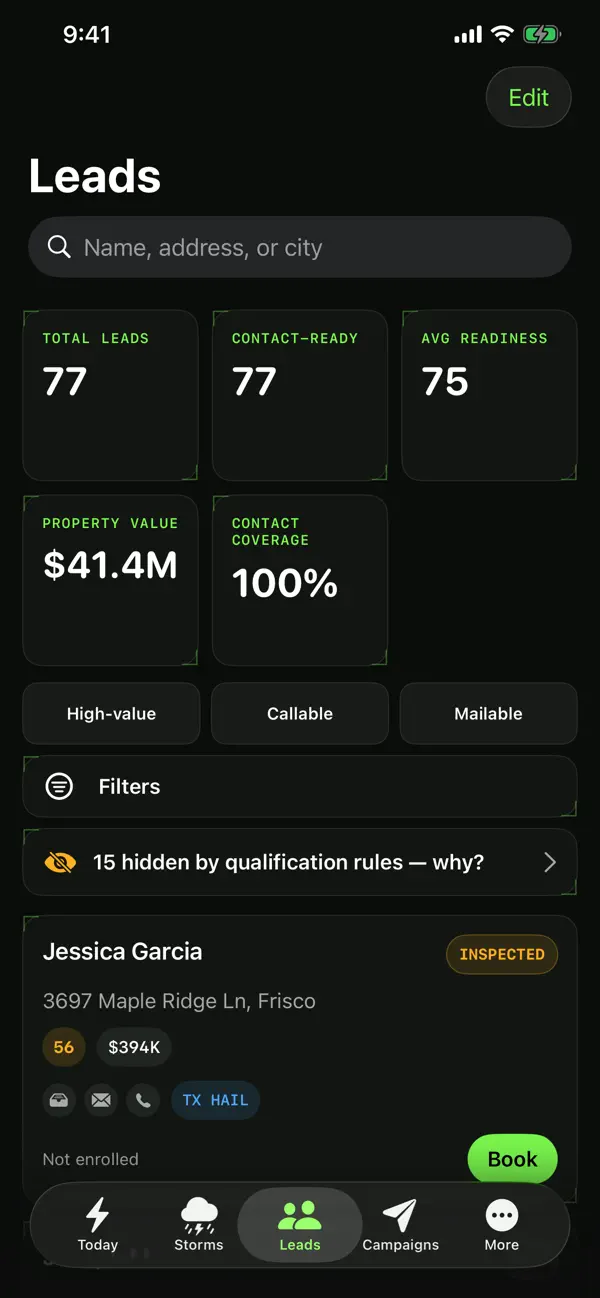
Review properties. Prioritize the next step.
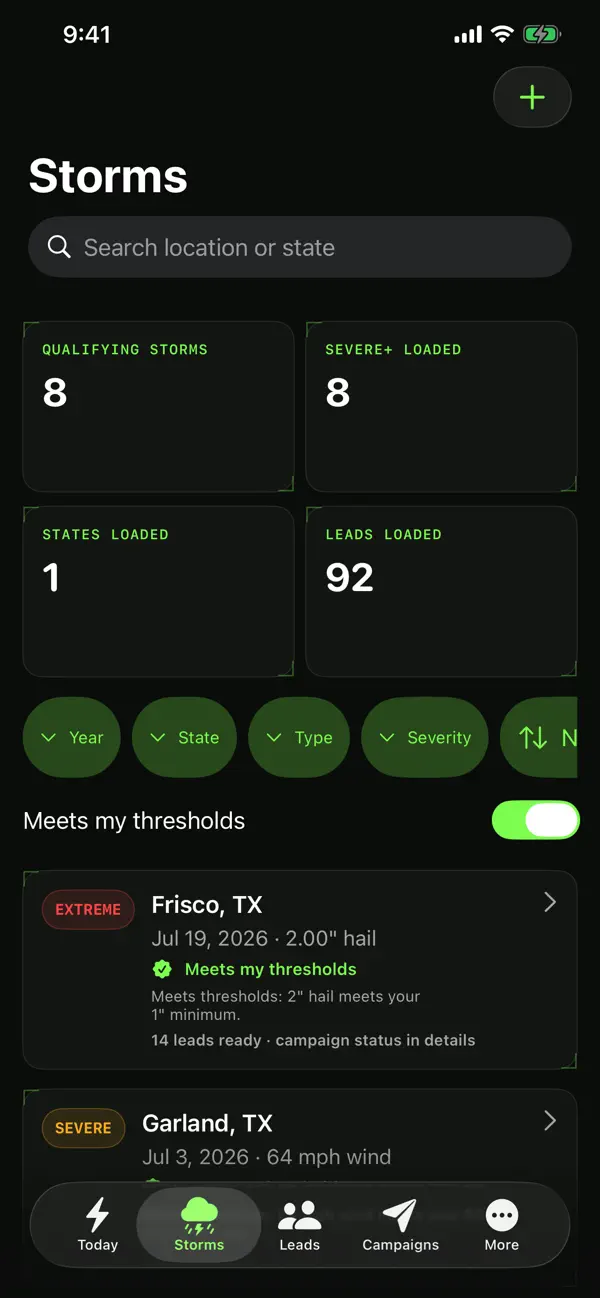
Keep the event and its context together.
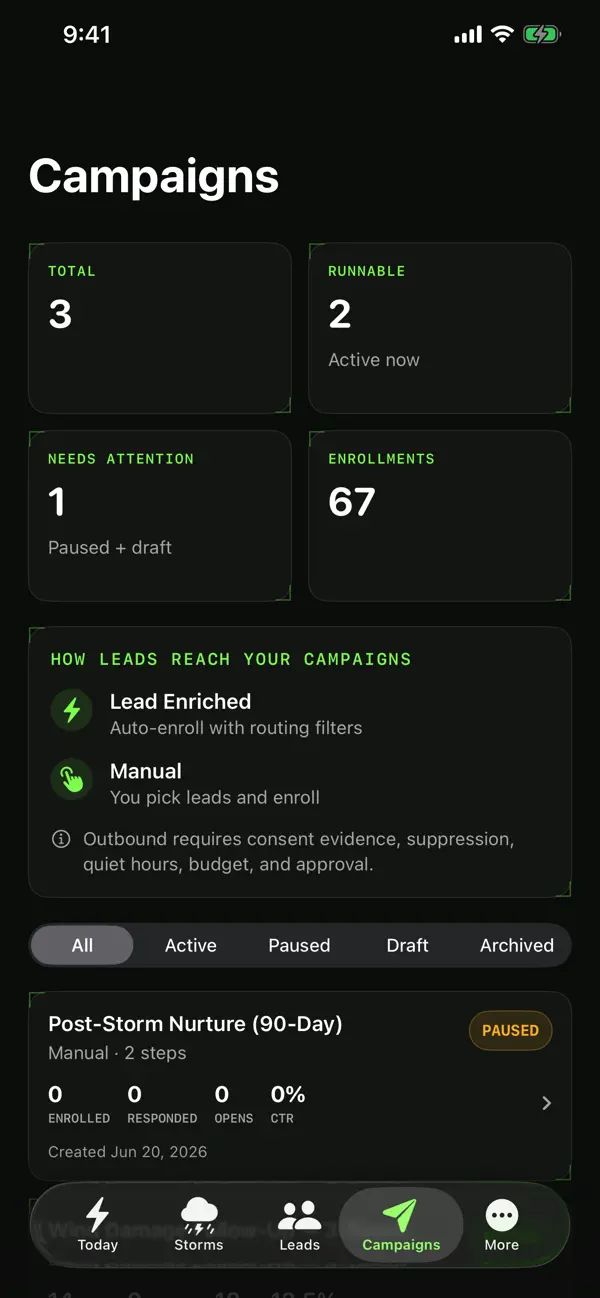
See the work your team has in motion.
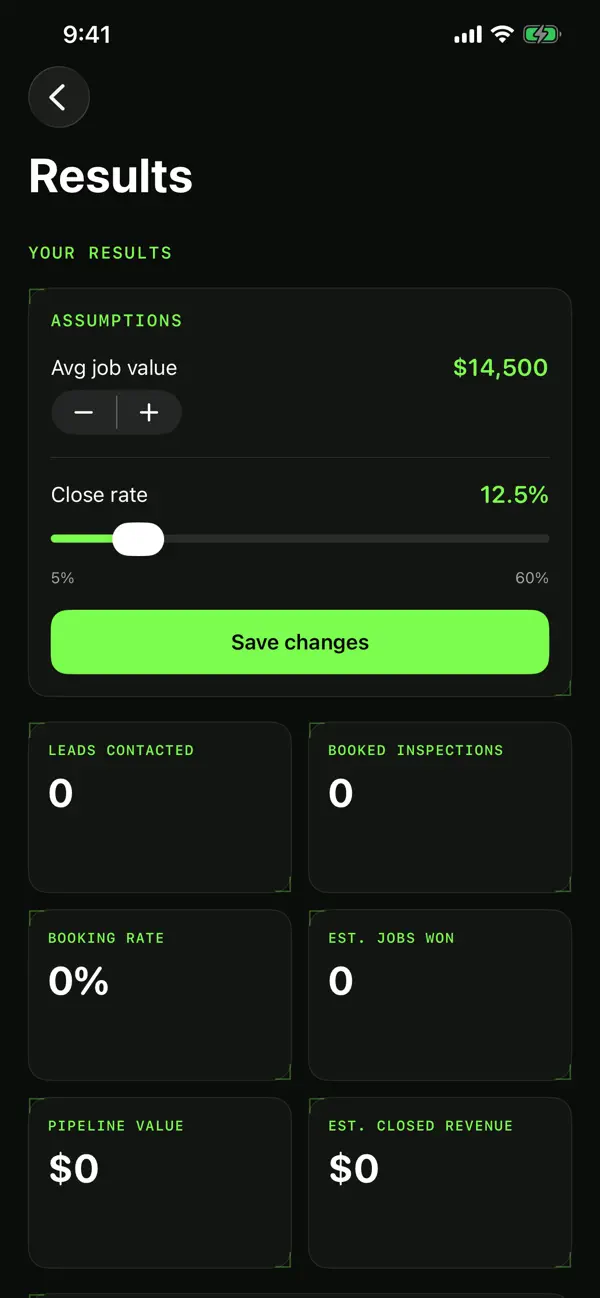
Follow appointments through to outcomes.
Actual app screens · Sample workspace data
Swipe to explore all four screens
Select a screen for a closer look
Configured weather sources are normalized into a shared event workspace. Feed freshness and provider availability are operational inputs—not hidden assumptions or uptime promises.
The product should make each decision traceable—from weather source to commercial outcome—without turning a storm signal into an unsupported damage or contact claim.
AI-STORMS should help an operator move from a weather record to a reviewable business decision without collapsing source evidence, property research, outreach eligibility, and outcomes into one misleading “lead” status.
Gate 01
Preserve provider, observation time, ingestion time, geography, measurement, and freshness. If provenance is missing, show that gap instead of silently filling it.
A weather signal is not proof of property damage.
Gate 02
Separate the weather footprint, candidate properties, available enrichment, and missing evidence so an operator can review each layer independently.
A property in a research area is not automatically a lead.
Gate 03
Require account identity, channel configuration, consent evidence, suppression inputs, timing rules, provider readiness, and human approval before any outbound action.
Software controls reduce operational risk; they do not guarantee legal compliance.
Gate 04
Track response, appointment, inspection, signed work, cost, and attribution as separate observed events. Keep scenario assumptions visibly separate from actual results.
Modeled pipeline value is not booked revenue or profit.
Build one repeatable operating path: validate the source, review the impact area, resolve contact eligibility, approve a channel, and measure the result. Automation should accelerate those controls, not erase them.
Stage 01 / 05
STEP 01
Record the ZIP codes your team can actually serve, along with trade, capacity, and campaign boundaries.
Stage 02 / 05
STEP 02
Review configured weather sources and their timestamps. Warnings identify candidates; radar estimates need property-specific evidence before outreach.
Stage 03 / 05
STEP 03
Build a list of properties potentially inside the impact area, then attach available owner and contact records for review.
Stage 04 / 05
STEP 04
Missing property evidence holds storm-triggered outreach. Eligible records still require campaign approval, consent, suppression, timing, budget, and provider checks.
Stage 05 / 05
STEP 05
Use the response and appointment workspace to qualify interest, schedule inspections, and connect downstream job outcomes to the originating event.
Example response packet
Reviewed property record
Weather source and property context attached. Contact eligibility and customer approval recorded separately.
Source context
Event source, observation time, severity, and geography remain visible.
Eligibility review
Consent evidence, suppression inputs, channel rules, and unresolved fields are reviewed before activation.
Approved channel
Only the channel and message approved for that audience should enter the activation queue.
Outcome trail
Responses, appointments, signed work, and margin can be linked back to the originating event.
Source status
Visible
Eligibility
Reviewed
Outcome
Linkable
The review packet
A large address count is not customer value. Operators need to know what the source observed, why the property is worth reviewing, what data is available, which actions are eligible, and what actually happened next.
Review the lead standardExample record structure
This is a structural example, not a real homeowner, customer result, provider acceptance, damage finding, or permission decision.
Source, issued time, event type, severity, geography, revision state, and feed health.
Potential intersection with an impact area plus available parcel context; damage remains unverified.
Provider, match and enrichment status, age, missing fields, duplicates, and delivery signals.
Seller, purpose, recipient, consent provenance, suppression checks, local time, policy, and reviewer.
Accepted, delivered, failed, replied, complained, opted out, or reconciled using the provider event ID.
Appointment, cancellation, inspection, signed work, collected revenue, margin, and attribution status.
The useful product is not an impressive lead counter. It is a controlled path from a source-backed storm signal to an attributable customer outcome.
Inspect source, freshness, event type, timestamp, and geography before treating an alert as actionable.
Separate potentially affected properties, available contact data, and missing evidence. Do not label every record as damage.
Resolve consent, suppression, quiet hours, budget, and provider readiness for the chosen channel.
Track response, appointment, signed work, revenue, margin, opt-outs, complaints, and data cost by event.
Roofing, siding, gutters, restoration, public adjusters, HVAC, landscaping, exteriors — if a storm makes you money, this is your system.
Use hail and wind context to research roof-inspection markets, review eligible actions, and measure signed work.
Use high-wind and hail observations to prioritize potentially exposed neighborhoods for review and inspection.
Use hail, wind, and heavy-rain context to research gutter and downspout inspection opportunities.
Separate inbound emergency demand from proactive storm-market research, then match work to safe crew capacity.
Licensed teams can review storm-affected areas, evidence, and channel eligibility before activating a jurisdiction-approved response workflow.
Use temperature and storm context to plan service readiness and review potential HVAC opportunities.
Use wind, flood, and hail context to prioritize cleanup areas, hazards, equipment, and crew capacity.
Route event research to the appropriate trade workflow while keeping inspection evidence and channel eligibility distinct.
These portal modules support the storm funnel. Exact data sources, channels, limits, and activation status vary by account and must be verified during setup.
Territory planning
Define serviceable ZIP codes, trades, capacity, and campaign boundaries for the account.
Monitoring alerts
Review weather candidates with source and time context; distinguish warnings from radar-estimated hail exposure.
Customer watchlist
Keep customer-owned addresses available for event review and approved follow-up planning.
Vertical packs
Trade-specific templates, scripts, and settings — install the pack for your trade.
Lead forms
Create, publish, share, or embed storm intake forms; submissions enter lead-form triage for operator review.
Website chat
Embeddable AI website chat configured with your Storms knowledge base, instructions, and guardrails.
Campaigns & workflows
Coordinate approved records, messages, schedules, channel rules, and provider handoffs.
Templates
Review email and postcard planning templates with storm-event merge fields; provider delivery still requires account activation.
Calendar
Use shared appointment surfaces with event and property context available for operator review.
Compliance scrubbing
Review configured consent, suppression, timing, and jurisdiction inputs before approving a channel action.
Replace the illustrative inputs with rates from your own operation. The planner applies no AI-STORMS uplift and makes no outcome promise.
MODELED GROSS JOB VALUE / YEAR
$504,000
Scenario only. Gross job value is not incremental revenue, profit, or a forecast. Results depend entirely on the inputs you provide.
Connected weather and property data with configurable eligibility, budget, and workflow controls.
A severe thunderstorm warning covers part of your territory. AI-STORMS presents candidate properties for review. Radar-estimated hail exposure requires property-specific source evidence; missing evidence holds outreach before campaign and channel approval.
Illustrative operating scenario, not a customer result or timing, volume, revenue, or compliance guarantee.
The 14-day platform-access trial is a safe product evaluation for configuring a territory, reviewing available storm intelligence, and walking through the approval workflow. It does not include real paid property/contact data, lead generation, or outbound delivery.
Business organization team. One state, one vertical, three named users, and hard-capped monthly usage.
Growing firm ready for multi-state monitoring and controlled outreach volume.
Multi-state operations with higher caps and configurable workflows after activation.
SMS, AI/prerecorded voice, ringless voicemail, Meta, Google, and YouTube campaigns are not generally available at launch. Email-first production delivery requires approved billing, budget, provider, audience, and compliance controls.
No badge replaces source verification, provider testing, customer approval, or qualified legal advice.
A valuable territory is not the largest map. It is the market your team can monitor, contact lawfully, service, and measure.
Crew travel, licenses, suppliers, and response capacity
The hail, wind, flood, or temperature events tied to your work
Source, observation time, geography, and confirmation level
Audience, consent evidence, suppression, and channel rules
Data budget, appointment slots, production backlog, and stop conditions
Event → eligible contact → appointment → signed job → margin
Evidence-reviewed guidance for planning territories, controlling outreach, and measuring the full storm-to-revenue pipeline.
Enter a ZIP to preload a walkthrough request. We’ll review observed storm activity, service-area fit, capacity, and the controls required before any outreach.
This page does not run a live availability check. Submitting a ZIP does not reserve, grant, or imply an exclusive territory.